Playwright
Playwright Page Object Model Example: From a Codegen Recording to Page Objects
One codegen recording of the Swag Labs checkout, turned into six page objects and a test that passes, with every file shown and every choice explained.
Most Playwright page object model examples start from an app you can't run and classes someone already designed. This one starts where many suites start: a script recorded with npx playwright codegen. It takes one recording of the Swag Labs demo shop at saucedemo.com, shows the page objects and the test it turns into, explains why each class has the shape it has, and runs the result. Every TypeScript file below was written by the free Playwright codegen to page objects converter and passed against saucedemo.com with Playwright 1.61, unchanged. If you only want the result for your own script, paste it there: it runs in your browser and needs no sign-up.
This post is the worked example. For when page objects help and how to hand them to tests with fixtures, read the Playwright page object model guide. For recording itself (flags, assertions, saved logins), read the Playwright codegen guide.
Key takeaways
- One class per page. Each class holds its locators as
readonlyfields, created in the constructor, and has a method for each thing a user does on that page. - A form is one method. Two login fields and the Login button become
login(username, password). The checkout form becomessubmit(firstName, lastName, postalCode). - The test reads as steps. Seventeen recorded actions become seven calls, and the one check stays as it was.
- Secrets leave the code. The test reads the password from
TEST_PASSWORDand stops with a clear message when it isn't set. - Review before you commit: the page names a recording can't know, and the checks it didn't make.
The recording
Swag Labs is a public demo shop built for test automation practice. The flow: sign in as standard_user, add the backpack to the cart, open the cart, check out with a name and a postal code, finish, and check the confirmation. This is the converter's Swag Labs sample, the script npx playwright codegen https://www.saucedemo.com/ writes for that flow:
import { test, expect } from '@playwright/test';

test('test', async ({ page }) => {
  await page.goto('https://www.saucedemo.com/');
  await page.locator('[data-test="username"]').click();
  await page.locator('[data-test="username"]').fill('standard_user');
  await page.locator('[data-test="password"]').click();
  await page.locator('[data-test="password"]').fill('secret_sauce');
  await page.locator('[data-test="login-button"]').click();
  await page.locator('[data-test="add-to-cart-sauce-labs-backpack"]').click();
  await page.locator('[data-test="shopping-cart-link"]').click();
  await page.locator('[data-test="checkout"]').click();
  await page.locator('[data-test="firstName"]').click();
  await page.locator('[data-test="firstName"]').fill('Ana');
  await page.locator('[data-test="lastName"]').click();
  await page.locator('[data-test="lastName"]').fill('Petrova');
  await page.locator('[data-test="postalCode"]').click();
  await page.locator('[data-test="postalCode"]').fill('1000');
  await page.locator('[data-test="continue"]').click();
  await page.locator('[data-test="finish"]').click();
  await expect(page.locator('[data-test="complete-header"]')).toContainText('Thank you for your order!');
});
It passes as it is. The trouble starts with the second test. A test for a wrong password, or for checking out two items, would copy most of these lines, and when the Login button changes, every copy has to change with it. The password sits in the source, the URL is fixed, there is a click before every fill, and the test is called test.
The page objects it becomes
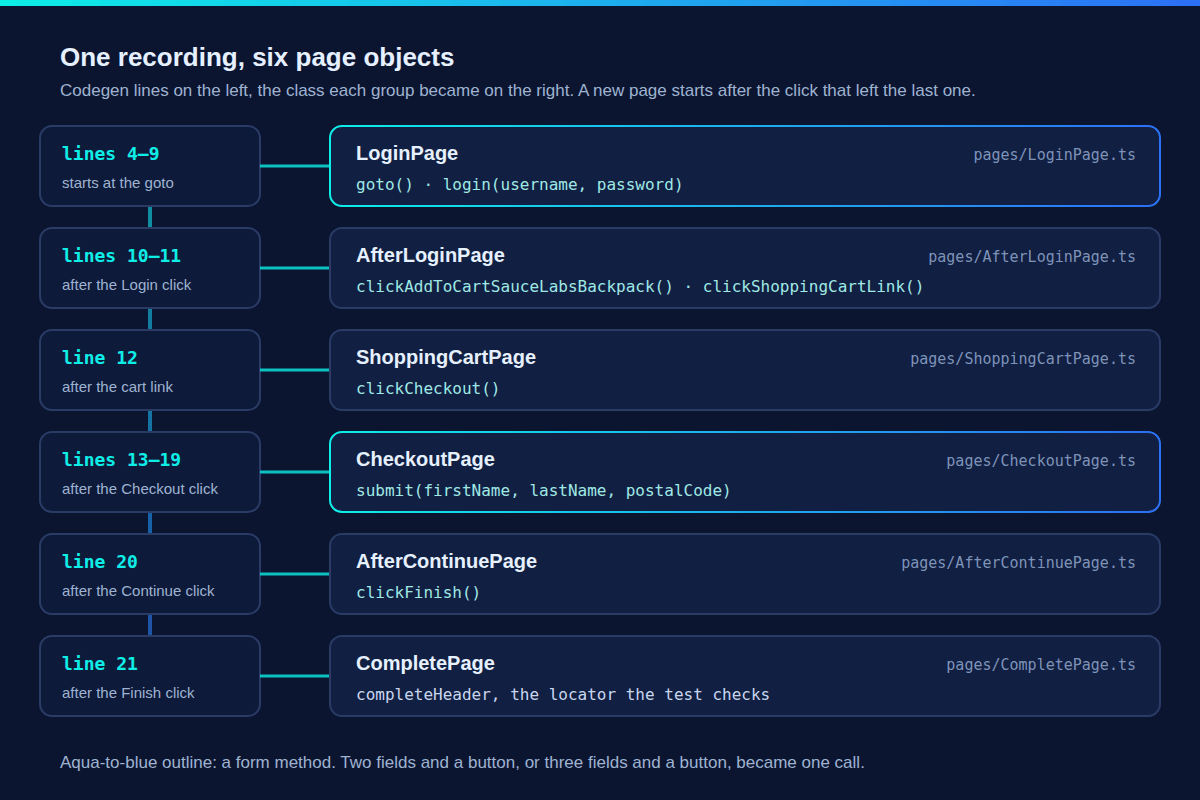
A page object model puts each page's locators and actions in one class, so tests call loginPage.login(...) instead of repeating selectors. The first job is to decide where one page ends and the next begins. Codegen doesn't record that, so the converter splits the flow at page.goto, at links, at buttons that submit a form or leave a page (Login, Checkout, Continue, Finish), and at headings you checked. Here is where each group of recorded lines went:
LoginPage: locators as fields, the form as one method
pages/LoginPage.ts:
import type { Locator, Page } from '@playwright/test';

export class LoginPage {
  readonly page: Page;
  readonly username: Locator;
  readonly password: Locator;
  readonly loginButton: Locator;

  constructor(page: Page) {
    this.page = page;
    this.username = page.locator('[data-test="username"]');
    this.password = page.locator('[data-test="password"]');
    this.loginButton = page.locator('[data-test="login-button"]');
  }

  async goto() {
    await this.page.goto('/');
  }

  async login(username: string, password: string) {
    await this.username.fill(username);
    await this.password.fill(password);
    await this.loginButton.click();
  }
}
This is the shape of the example in Playwright's own page object models guide: a readonly page, one readonly locator per element, all assigned in the constructor, and async methods for the actions. Three details are worth knowing:
- Creating a locator does nothing yet. A
Locatordescribes how to find an element. Playwright looks for it only when you click, fill or assert, so creating every locator in the constructor costs nothing and never goes stale. goto()opens/, not the full URL. The address comes frombaseURLin your config, so the same test runs against a local build or staging without an edit.login(username, password)replaces lines 5 to 9. The clicks before each fill are gone, becausefill()focuses the field itself. The parameters are named after the fields they fill.
AfterLoginPage: one method per action
pages/AfterLoginPage.ts:
import type { Locator, Page } from '@playwright/test';

export class AfterLoginPage {
  readonly page: Page;
  readonly addToCartSauceLabsBackpackButton: Locator;
  readonly shoppingCartLink: Locator;

  constructor(page: Page) {
    this.page = page;
    this.addToCartSauceLabsBackpackButton = page.locator('[data-test="add-to-cart-sauce-labs-backpack"]');
    this.shoppingCartLink = page.locator('[data-test="shopping-cart-link"]');
  }

  async clickAddToCartSauceLabsBackpack() {
    await this.addToCartSauceLabsBackpackButton.click();
  }

  async clickShoppingCartLink() {
    await this.shoppingCartLink.click();
  }
}
The two clicks on the products page aren't a form, so each one gets a method of its own, named after the element it clicks. The class name is the converter being honest: the recording holds no URL or heading for this page, so it is named after the click that led to it. The review section below renames it.
ShoppingCartPage and AfterContinuePage have the same shape, with one locator and one method each: clickCheckout() and clickFinish().
CheckoutPage: three fields and a button
pages/CheckoutPage.ts:
import type { Locator, Page } from '@playwright/test';

export class CheckoutPage {
  readonly page: Page;
  readonly firstName: Locator;
  readonly lastName: Locator;
  readonly postalCode: Locator;
  readonly continueButton: Locator;

  constructor(page: Page) {
    this.page = page;
    this.firstName = page.locator('[data-test="firstName"]');
    this.lastName = page.locator('[data-test="lastName"]');
    this.postalCode = page.locator('[data-test="postalCode"]');
    this.continueButton = page.locator('[data-test="continue"]');
  }

  async submit(firstName: string, lastName: string, postalCode: string) {
    await this.firstName.fill(firstName);
    await this.lastName.fill(lastName);
    await this.postalCode.fill(postalCode);
    await this.continueButton.click();
  }
}
Lines 13 to 19 of the recording, seven lines with three clicks that did nothing useful, become one call. The method takes the values in the order the recording filled them, so the test decides what to type and the page object decides how.
CompletePage: a locator for the check
pages/CompletePage.ts:
import type { Locator, Page } from '@playwright/test';

export class CompletePage {
  readonly page: Page;
  readonly completeHeader: Locator;

  constructor(page: Page) {
    this.page = page;
    this.completeHeader = page.locator('[data-test="complete-header"]');
  }
}
Nothing is done on this page, it is only checked, so the class has a locator and no methods. The assertion itself stays in the test.
The test that uses them
tests/login-to-complete.spec.ts:
import { test, expect } from '@playwright/test';
import { LoginPage } from '../pages/LoginPage';
import { AfterLoginPage } from '../pages/AfterLoginPage';
import { ShoppingCartPage } from '../pages/ShoppingCartPage';
import { CheckoutPage } from '../pages/CheckoutPage';
import { AfterContinuePage } from '../pages/AfterContinuePage';
import { CompletePage } from '../pages/CompletePage';

test('login to complete', async ({ page }) => {
  const loginPage = new LoginPage(page);
  const afterLoginPage = new AfterLoginPage(page);
  const shoppingCartPage = new ShoppingCartPage(page);
  const checkoutPage = new CheckoutPage(page);
  const afterContinuePage = new AfterContinuePage(page);
  const completePage = new CompletePage(page);

  await loginPage.goto();
  await loginPage.login('standard_user', env('TEST_PASSWORD'));
  await afterLoginPage.clickAddToCartSauceLabsBackpack();
  await afterLoginPage.clickShoppingCartLink();
  await shoppingCartPage.clickCheckout();
  await checkoutPage.submit('Ana', 'Petrova', '1000');
  await afterContinuePage.clickFinish();
  await expect(completePage.completeHeader).toContainText('Thank you for your order!');
});

/** Reads a secret the converter moved out of the code. */
function env(name: string): string {
  const value = process.env[name];
  if (!value) throw new Error(`Set ${name} in your environment to run this test.`);
  return value;
}
What this file does, and why:
- It creates the page objects itself.
new LoginPage(page)at the top of the test is how the Playwright docs do it, and it keeps the file self-contained. When several tests share these pages, move the creation intotest.extendfixtures, as the page object model guide shows. The page classes don't change. - The check is a plain
expect()in the test. The page objects hold no assertions, so a wrong-password test can reuselogin()and assert the error instead. - The password comes from the environment.
env('TEST_PASSWORD')reads it, and the small helper at the end of the file stops the test withSet TEST_PASSWORD in your environment to run this test.when it is missing or empty, instead of typing nothing into the field and failing later at sign-in. - The other values stay in the test as data. The username, the name and the postal code aren't secrets. Keeping them in the calls makes a second test with other values a one-line change.
- It has a name. Codegen calls every test
test. The converter names it after its first and last page, "login to complete", which is a start. Rename it to what it proves.
Run it
These are the converter's three steps for adding the files to a project you already have:
- Copy
pages/andtests/login-to-complete.spec.tsinto your Playwright project, withpages/next to your tests folder (the test imports../pages/). - Set the base URL in
playwright.config.ts:use: { baseURL: 'https://www.saucedemo.com' }. - Set the password and run the test:
TEST_PASSWORD=secret_sauce npx playwright test login-to-completeRunning 1 test using 1 worker
✓ 1 [chromium] › tests/login-to-complete.spec.ts:9:5 › login to complete (879ms)
1 passed (1.4s)secret_sauce is the shared password Swag Labs prints on its own login page, which is the only reason it can appear in a blog post. For your app, keep the value in a local .env file that git ignores and in a CI secret; the Playwright environment variables guide shows both.
Run with --repeat-each 10, the test passed 10 times out of 10, and all seven files type-check with tsc --strict. Without TEST_PASSWORD it fails at once, on the line that reads it, with the message above. If you don't have a Playwright project yet, the converter's New project download puts the same files in a project with a config, a package.json, an .env.example and a GitHub Actions workflow.
What to review before you commit
Rename the pages the recording couldn't name
Two class names are guesses. AfterLoginPage is the shop's product list, and AfterContinuePage is the order overview. Rename both in the converter's Pages tab, and give the test a name in the field above the code, and the converter writes the same classes under the new names. The test becomes:
import { test, expect } from '@playwright/test';
import { LoginPage } from '../pages/LoginPage';
import { InventoryPage } from '../pages/InventoryPage';
import { ShoppingCartPage } from '../pages/ShoppingCartPage';
import { CheckoutPage } from '../pages/CheckoutPage';
import { CheckoutOverviewPage } from '../pages/CheckoutOverviewPage';
import { CompletePage } from '../pages/CompletePage';

test('buy a backpack', async ({ page }) => {
  const loginPage = new LoginPage(page);
  const inventoryPage = new InventoryPage(page);
  const shoppingCartPage = new ShoppingCartPage(page);
  const checkoutPage = new CheckoutPage(page);
  const checkoutOverviewPage = new CheckoutOverviewPage(page);
  const completePage = new CompletePage(page);

  await loginPage.goto();
  await loginPage.login('standard_user', env('TEST_PASSWORD'));
  await inventoryPage.clickAddToCartSauceLabsBackpack();
  await inventoryPage.clickShoppingCartLink();
  await shoppingCartPage.clickCheckout();
  await checkoutPage.submit('Ana', 'Petrova', '1000');
  await checkoutOverviewPage.clickFinish();
  await expect(completePage.completeHeader).toContainText('Thank you for your order!');
});

/** Reads a secret the converter moved out of the code. */
function env(name: string): string {
  const value = process.env[name];
  if (!value) throw new Error(`Set ${name} in your environment to run this test.`);
  return value;
}
The renamed version passes too. Names matter more than they look: once a second test imports InventoryPage, renaming it means editing both.
Add the checks the recording skipped
The recording checks one thing, at the very end. That is less than it looks: if the backpack never reached the cart, this test would still pass, because Swag Labs lets you check out an empty cart and thanks you for the order all the same (we ran that flow without the add-to-cart click to be sure). Add a check after each step that should change something on the page, such as the cart badge after adding the backpack. Write those checks in the test, next to the step, so the page objects stay free of assertions. Codegen can record checks while you record; the codegen guide shows how.
Decide what to do with the test id locators
Every locator here is page.locator('[data-test="…"]'): Swag Labs marks its elements with a data-test attribute, and codegen prefers a test id like this over a role. They are good locators, and the converter keeps every locator exactly as codegen wrote it. If your app uses data-test everywhere, set testIdAttribute: 'data-test' in the use block of your config and record with npx playwright codegen --test-id-attribute=data-test; codegen then writes getByTestId(…) for the same elements.
When a recording has a locator that depends on an element's position on the page, such as an nth-child chain or .first(), the converter keeps it and adds a // Review: comment above it in the page object with the fix. This recording has none.
Where Blendra fits
The converter cleans up a script you already have. Blendra starts one step earlier: it records the flow in Chrome, saves fallback locators and checks from what each page showed, and keeps the tests in your repo current with npx blendra pull. The pricing page lists what each plan includes.
FAQ
Is this the same shape as the page object model in the Playwright docs?
Yes. The docs' example class has a readonly page, readonly locators assigned in the constructor, and async methods for actions, and so does every class here. The page object model guide writes the page as a constructor parameter property (constructor(private readonly page: Page)), which TypeScript treats the same way.
Why doesn't the test use fixtures?
Because one test doesn't need them, and a converted test should run as it is in any project. Fixtures pay off once several tests share setup, such as a signed-in user. Moving these page objects into test.extend changes only the test files.
Should page objects contain assertions?
Not in this example: the page objects find and operate elements, and the test decides what must be true. Some teams allow a shared, named check in a page object. The page object model guide gives both sides.
Can I convert my own codegen script the same way?
Yes, if it is the JavaScript or TypeScript output of npx playwright codegen, from Playwright 1.30 or later, one test at a time. The converter runs in your browser and the script isn't uploaded. Python, Java and .NET output aren't read.
To turn your own recording into page objects and a test like these, paste it into the free codegen to page objects converter.